This document compares the computational performance of the pure Python implementation (SplineSmootherPy) and the C++ optimized implementation (SplineSmoother) of the smoothing spline fitter.
Setup
import numpy as np
import matplotlib.pyplot as plt
import time
import sys
import os

# Ensure we can import from tests
sys.path.append(os.path.abspath('..'))

from scatter_smooth import SplineSmoother
try:
    from tests.spline_fitter import SplineSmoother as SplineSmootherPy
except ImportError:
    print("Could not import pure Python SplineSmoother from tests.")
    SplineSmootherPy = None
Speed Comparison at Different Scales
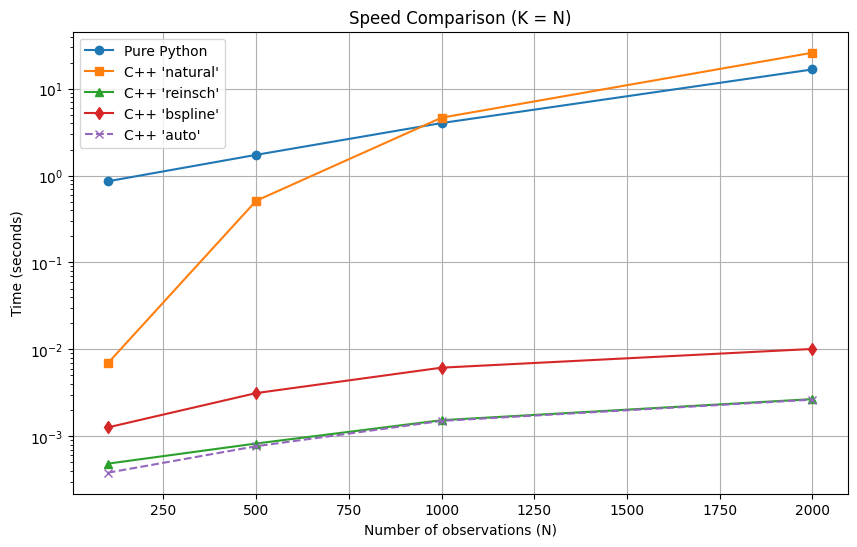
We will measure the time taken to fit the smoothing spline for different numbers of observations () and different numbers of knots (). We will explicitly test the Natural Spline engine (basis form) and the Reinsch engine (when applicable) and the B-Spline engine.
def benchmark_fitters(ns, n_knots=None, engine='reinsch', python=True):
    results = {'py': [], 'cpp': []}

    for n in ns:
        rng = np.random.default_rng(0)
        x = np.sort(rng.uniform(0, 10, n))
        y = np.sin(x) + rng.normal(0, 0.1, n)

        # Pure Python (always basis form natural spline)
        if python:
            start = time.time()
            fitter_py = SplineSmootherPy(x, n_knots=n_knots, df=10)
            fitter_py.smooth(y)
            results['py'].append(time.time() - start)

        try:
            start = time.time()
            # Explicitly request engine
            fitter_cpp = SplineSmoother(x, df=10, n_knots=n_knots, engine=engine)
            fitter_cpp.smooth(y)
            results['cpp'].append(time.time() - start)
        except ValueError:
            # Engine might not be compatible (e.g. reinsch with reduced knots)
            results['cpp'].append(np.nan)

    return results

# Sizes to test
ns = [100, 500, 1000, 2000, 5000][:4]
1. All Unique X as Knots (K = N)
When is small, using all unique values as knots is feasible. We compare:
Pure Python (Natural Spline Basis)
C++
engine='natural'(Natural Spline Basis)C++
engine='reinsch'(Reinsch Algorithm - O(N))C++
engine='bspline'(B-Spline Basis)C++
engine='auto'(Default Selection)
print(f"Benchmarking with ns={ns} (All Knots)...")
results_natural = benchmark_fitters(ns, engine='natural')
results_py = results_natural['py']
results_natural = results_natural['cpp']
results_reinsch = benchmark_fitters(ns, engine='reinsch', python=False)['cpp']
results_bspline = benchmark_fitters(ns, engine='bspline', python=False)['cpp']
results_auto = benchmark_fitters(ns, engine='auto', python=False)['cpp']

fig, ax = plt.subplots(figsize=(10, 6))
if SplineSmootherPy:
    ax.plot(ns, results_py, 'o-', label='Pure Python')
ax.plot(ns, results_natural, 's-', label="C++ 'natural'")
ax.plot(ns, results_reinsch, '^-', label="C++ 'reinsch'")
ax.plot(ns, results_bspline, 'd-', label="C++ 'bspline'")
ax.plot(ns, results_auto, 'x--', label="C++ 'auto'")

ax.set_xlabel('Number of observations (N)')
ax.set_ylabel('Time (seconds)')
ax.set_title('Speed Comparison (K = N)')
ax.legend()
ax.grid(True)
ax.set_yscale('log')
Benchmarking with ns=[100, 500, 1000, 2000] (All Knots)...
2. Fixed Number of Knots (K=200)
In practice, for large , we often limit the number of knots to a fixed .
engine='reinsch' is not available here (requires K=N). We demonstrate time required for bspline as increases.
ns_large = [100, 500, 1000, 1500, 2000, 5000, 10000, 20000, 30000, 50000]
K = 200
print(f"Benchmarking with large N and K={K}...")
results_fixed_bspline = benchmark_fitters(ns_large, n_knots=K, engine='bspline', python=False)['cpp']
Benchmarking with large N and K=200...
fig, ax = plt.subplots(figsize=(10, 6))
ax.plot(ns_large, results_fixed_bspline, 'd-', label=f"C++ 'bspline' (K={K})")

ax.set_xlabel('Number of observations (N)')
ax.set_ylabel('Time (seconds)')
ax.set_title(f'Speed Comparison (Fixed K={K})')
ax.legend()
ax.grid(True)
ax.set_yscale('log')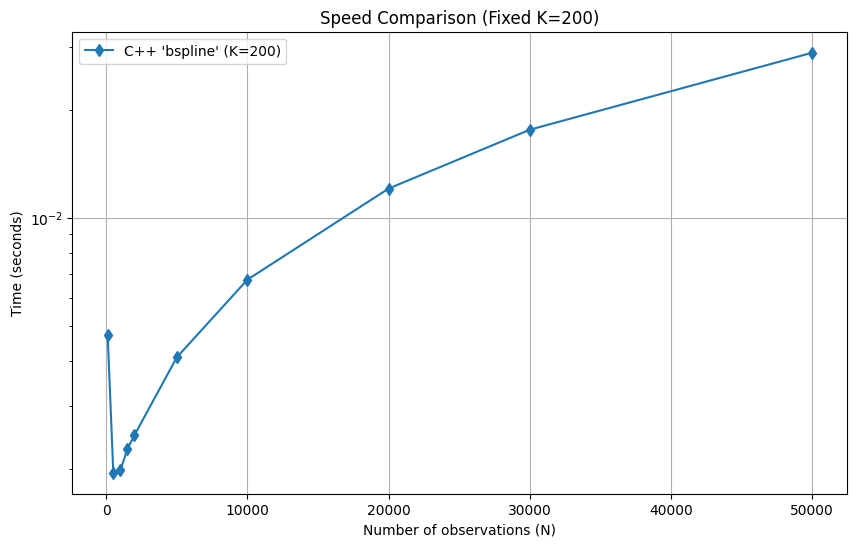
GCV Solve Performance
Automatic tuning with GCV involves multiple fits (or an optimized path). The C++ extension provides a highly optimized solve_gcv method.
n = 5000
K = 200
rng = np.random.default_rng(0)
x = np.sort(rng.uniform(0, 10, n))
y = np.sin(x) + rng.normal(0, 0.1, n)
%%timeit
fitter = SplineSmoother(x, n_knots=K)
best_lam = fitter.solve_gcv(y)45.7 ms ± 105 μs per loop (mean ± std. dev. of 7 runs, 10 loops each)
%%timeit
fitter = SplineSmoother(x)
best_lam = fitter.solve_gcv(y)
33.5 ms ± 330 μs per loop (mean ± std. dev. of 7 runs, 10 loops each)
Conclusion
The C++ extension provides significant speedups, especially as the number of knots or observations increases. This is due to the efficient matrix operations and optimized algorithms implemented in C++ using the Eigen library.