This document illustrates the differences in boundary behavior and extrapolation between scatter_smooth.SplineSmoother and scipy.interpolate.make_smoothing_spline.
While both methods fit smoothing splines, scatter_smooth explicitly implements natural cubic splines, which implies that the function should be linear beyond the boundary knots (i.e., the second derivative is zero at the boundaries).
We will demonstrate this by fitting both models to a dataset and observing their predictions outside the range of the training data.
Setup
import numpy as np
import matplotlib.pyplot as plt
from scipy.interpolate import make_smoothing_spline
from scatter_smooth import SplineSmoother

# Generate synthetic data
rng = np.random.default_rng(42)
n = 50
x = np.sort(rng.uniform(0, 10, n))
y = np.sin(x) + rng.normal(0, 0.2, n)

# Define extrapolation range (+/- 50% of data range)
x_range = x.max() - x.min()
x_plot = np.linspace(x.min() - 0.5 * x_range, x.max() + 0.5 * x_range, 200)
Fitting the Models
We will fit both models using a similar regularization strength. Note that the parameterization of might differ slightly, but we will try to match the degrees of freedom or visual smoothness for a fair qualitative comparison. Here we fix lam for make_smoothing_spline and use solve_gcv or fixed lambda for SplineSmoother.
For simplicity, let’s fix a lambda value that provides a reasonable smooth fit.
# Fit scatter_smooth
# We explicitly ask for a specific lambda or let GCV find one.
# Let's use GCV for scatter_smooth to get a good fit first.
fitter = SplineSmoother(x, n_knots=25)
lam_best = fitter.solve_gcv(y)
y_ours = fitter.predict(x_plot)

# Fit scipy.interpolate.make_smoothing_spline
# scipy's lam is roughly related. We'll try to use a similar value or just pick one that looks good.
# SciPy documentation says minimizes \sum w_i (y_i - g(x_i))^2 + lam \int g''(t)^2 dt
# Our objective is essentially the same.
# Note: SplineSmoother scales x internally to [0, range]. Scipy does not?
# Let's just try to match them or show the qualitative difference.
# We'll calculate the lambda that scipy would use?
# Let's just fit scipy with a specific lambda to ensure smoothness.
lam_scipy = 1e-2 # heuristic
spl_scipy = make_smoothing_spline(x, y, lam=lam_scipy)
y_scipy = spl_scipy(x_plot)Visualization
Now we plot the data, the fitted curves within the data range, and the extrapolation.
fig, ax = plt.subplots(figsize=(10, 6))

# Plot Data
ax.scatter(x, y, color='black', label='Data', zorder=5)

# Plot scatter_smooth result
ax.plot(x_plot, y_ours, 'b-', linewidth=2, label='scatter_smooth (Natural)')

# Plot scipy result
ax.plot(x_plot, y_scipy, 'r--', linewidth=2, label='scipy.interpolate.make_smoothing_spline')

# Highlight data boundaries
ax.axvline(x.min(), color='gray', linestyle=':', alpha=0.5)
ax.axvline(x.max(), color='gray', linestyle=':', alpha=0.5)

ax.set_title('Extrapolation Behavior: Natural vs. SciPy Spline')
ax.legend()
ax.grid(True, alpha=0.3)
ax.set_ylim([-10,10])
(-10.0, 10.0)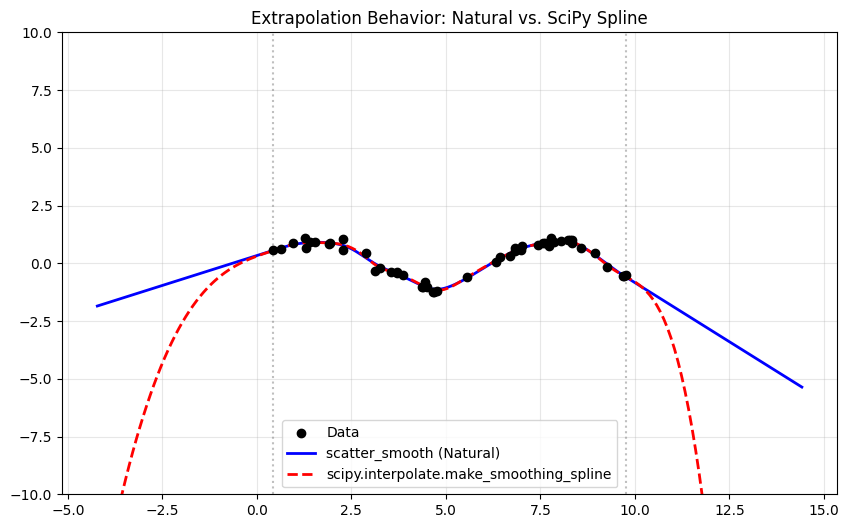
Analysis
As seen in the plot:
scatter_smooth: The blue line becomes perfectly linear outside the vertical dashed lines (the data boundaries). This is the defining property of a natural cubic spline. The second derivative is zero at the boundary knots, and this zero curvature is maintained during extrapolation.scipy.interpolate.make_smoothing_spline: The red dashed line usually exhibits cubic extrapolation (it curves away). Whilemake_smoothing_splinesolves the smoothing spline objective, the returned B-spline object often extrapolates based on the polynomial form of the end segments, which is not necessarily constrained to be linear unless specific boundary knots or coefficients are enforced. In many statistical contexts, the “natural” boundary condition (linear extrapolation) is preferred to avoid wild oscillations outside the data range.
This highlights a key feature of the scatter_smooth package: it guarantees safe, linear extrapolation by design.