This document demonstrates the usage of the scatter_smooth package and compares it with the standard smooth.spline function in R. We will use the Bikeshare dataset from the ISLP package.
Setup
First, we need to import the necessary libraries and load the rpy2 extension to run R code directly in this notebook.
import numpy as np
import pandas as pd
import matplotlib.pyplot as plt
import time
from scatter_smooth.datasets import load_bikeshare
from scatter_smooth import SplineSmoother

%load_ext rpy2.ipython
Loading the Data
We will use the Bikeshare dataset, which contains daily counts of bike rentals in Washington D.C.
Bike = pd.read_csv(load_bikeshare())
Bike.head()We will focus on the relationship between the hour of the day (hr) and the number of bikers (bikers). Since hr is categorical in the original dataset but represents time, we convert it to numeric.
df = 7
# 'bikers' is 'cnt' in the original dataset, ISLP might have renamed it or we use 'cnt'
if 'bikers' not in Bike.columns:
    Bike['bikers'] = Bike['cnt']

hr_numeric = pd.to_numeric(Bike['hr'])
bikers = Bike['bikers']

# Sort by hour for cleaner plotting lines
sorted_idx = np.argsort(hr_numeric)
x_plot = hr_numeric.iloc[sorted_idx].unique()
Fitting Smoothing Splines
1. Using scatter_smooth (Python)
We fit a smoothing spline with a specified degrees of freedom ().
# Fit model
spl_py = SplineSmoother(x=hr_numeric, df=df)
spl_py.smooth(bikers)

# Predict
y_py = spl_py.predict(x_plot)
2. Using smooth.spline (R)
We fit the same model using R. We transfer the data to R and run the smooth.spline function.
%%R -i hr_numeric -i bikers -o y_r -i df
# Fit model in R
fit_r <- smooth.spline(hr_numeric, bikers, df=df)

# Predict at unique hours
# unique() in R returns unsorted, but we want to match x_plot order
x_vals <- sort(unique(hr_numeric))
pred_r <- predict(fit_r, x_vals)
y_r <- pred_r$yComparison
Let’s visualize the results. They should be nearly identical.
fig, ax = plt.subplots(figsize=(10, 6))
ax.scatter(hr_numeric + np.random.normal(0, 0.1, len(hr_numeric)), bikers,
            s=1, c='lightgray', alpha=0.5, label='Data')
ax.plot(x_plot, y_py, 'b-', lw=3, label='Python (scatter_smooth)', alpha=0.8)
ax.plot(x_plot, y_r, 'r--', lw=3, label='R (smooth.spline)', alpha=0.8)
ax.set_xlabel("Hour")
ax.set_ylabel("Number of Bikers")
ax.set_title("Comparison of Smoothing Splines (df={df})")
ax.legend()
plt.show()

# Numerical comparison
# Note: R might handle repeated x values slightly differently (using weights)
# scatter_smooth handles them naturally in the basis construction.
diff = np.mean(np.abs(y_py - y_r))
print(f"Mean Absolute Difference: {diff:.6f}")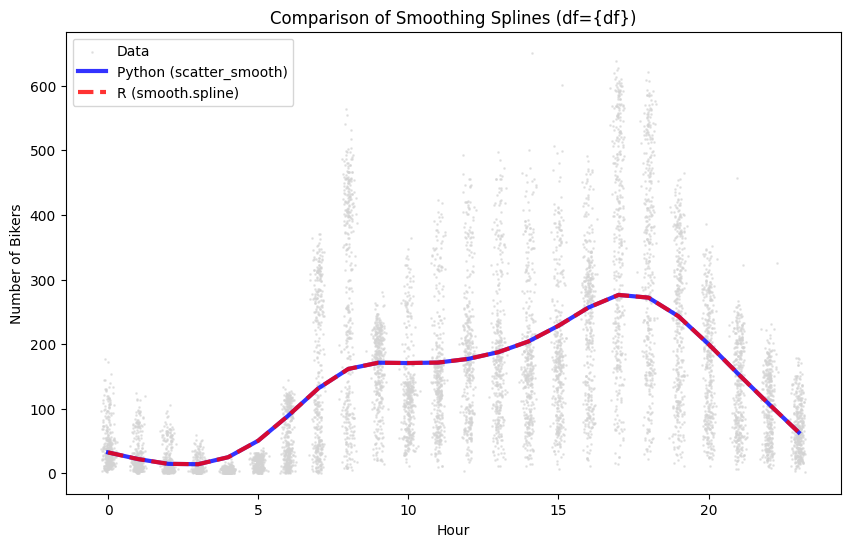
Mean Absolute Difference: 0.003490
Speed Comparison
We will compare the execution time for fitting the model.
# Python Timing
t_py = %timeit -o -n 10 -r 3 SplineSmoother(x=hr_numeric, df=10).smooth(bikers)

# R Timing
4.69 ms ± 1.18 ms per loop (mean ± std. dev. of 3 runs, 10 loops each)
%%R -i hr_numeric -i bikers
if (!require("microbenchmark", quietly = TRUE)) {
    install.packages("microbenchmark", repos="http://cloud.r-project.org")
}
library(microbenchmark)
# R Timing
summary(microbenchmark(
  smooth.spline(hr_numeric, bikers, df=10),
  times=10), unit='milliseconds')[,-1]
* installing *source* package ‘microbenchmark’ ...
** this is package ‘microbenchmark’ version ‘1.5.0’
** package ‘microbenchmark’ successfully unpacked and MD5 sums checked
** using staged installation
checking for gcc... gcc -std=gnu2x
checking whether the C compiler works... yes
checking for C compiler default output file name... a.out
checking for suffix of executables...
checking whether we are cross compiling... no
checking for suffix of object files... o
checking whether the compiler supports GNU C...
yes
checking whether gcc -std=gnu2x accepts -g... yes
checking for gcc -std=gnu2x option to enable C11 features... none needed
checking for stdio.h... yes
checking for stdlib.h... yes
checking for string.h... yes
checking for inttypes.h... yes
checking for stdint.h... yes
checking for strings.h... yes
checking for sys/stat.h... yes
checking for sys/types.h... yes
checking for unistd.h... yes
checking for stdint.h... (cached) yes
checking for stdlib.h... (cached) yes
checking for sys/time.h... yes
checking for uint64_t... yes
checking for error_at_line... yes
checking for mach_absolute_time... no
checking for library containing clock_gettime... none required
checking for best clockid_t to use with clock_gettime... CLOCK_MONOTONIC_RAW
configure: creating ./config.status
config.status: creating src/Makevars
config.status: creating src/config.h
** libs
using C compiler: ‘gcc (Ubuntu 13.3.0-6ubuntu2~24.04) 13.3.0’
gcc -std=gnu2x -I"/opt/R/4.5.2/lib/R/include" -DNDEBUG -D_POSIX_C_SOURCE=200112L -DHAVE_CONFIG_H  -I/usr/local/include    -fpic  -g -O2  -c do_nothing.c -o do_nothing.o
gcc -std=gnu2x -I"/opt/R/4.5.2/lib/R/include" -DNDEBUG -D_POSIX_C_SOURCE=200112L -DHAVE_CONFIG_H  -I/usr/local/include    -fpic  -g -O2  -c init.c -o init.o
gcc -std=gnu2x -I"/opt/R/4.5.2/lib/R/include" -DNDEBUG -D_POSIX_C_SOURCE=200112L -DHAVE_CONFIG_H  -I/usr/local/include    -fpic  -g -O2  -c nanotimer.c -o nanotimer.o
gcc -std=gnu2x -shared -L/opt/R/4.5.2/lib/R/lib -L/usr/local/lib -o microbenchmark.so do_nothing.o init.o nanotimer.o -L/opt/R/4.5.2/lib/R/lib -lR
installing to /home/runner/work/_temp/Library/00LOCK-microbenchmark/00new/microbenchmark/libs
** R
** inst
** byte-compile and prepare package for lazy loading
** help
*** installing help indices
** building package indices
** testing if installed package can be loaded from temporary location
** checking absolute paths in shared objects and dynamic libraries
** testing if installed package can be loaded from final location
min lq mean median uq max neval
1 1.416332 1.44166 1.508846 1.470314 1.509967 1.845543 10
** testing if installed package keeps a record of temporary installation path
* DONE (microbenchmark)
Installing package into ‘/home/runner/work/_temp/Library’
(as ‘lib’ is unspecified)
trying URL 'http://cloud.r-project.org/src/contrib/microbenchmark_1.5.0.tar.gz'
Content type 'application/x-gzip' length 61673 bytes (60 KB)
==================================================
downloaded 60 KB


The downloaded source packages are in
	‘/tmp/RtmpnP0ZwH/downloaded_packages’
Automatic Tuning with GCV
One of the key features of smoothing splines is the automatic selection of the smoothing parameter () using Generalized Cross-Validation (GCV).
In R
R’s smooth.spline uses GCV (or CV) by default if df and spar are not specified.
%%R
fit_gcv <- smooth.spline(hr_numeric, bikers, cv=FALSE) # cv=FALSE implies GCV
cat("Selected df (R):", fit_gcv$df, "
")
cat("Selected lambda (R):", fit_gcv$lambda, "
")
Selected df (R): 23.09998
Selected lambda (R): 9.504108e-05
In Python (scatter_smooth)
The scatter_smooth package also supports finding that minimizes the GCV score via the solve_gcv method.
# Initialize fitter with data
# Note: We use the internal C++ fitter for speed if available
fitter = SplineSmoother(x=hr_numeric, knots=np.unique(hr_numeric))

# Solve for GCV
best_lam = fitter.solve_gcv(bikers)
print(f"Selected lambda (Python): {best_lam}")

# Get corresponding df
# We can access the internal fitter to compute DF for verification
if fitter._cpp_fitter:
    best_lam_scaled = best_lam / fitter.x_scale_**3
    best_df = fitter._cpp_fitter.compute_df(best_lam_scaled)
    print(f"Selected df (Python): {best_df}")
else:
    best_df = "N/A (C++ extension not available)"
Selected lambda (Python): 2.6911512087490322e-05
Selected df (Python): 23.999975996167816
We can now visualize the optimal fit.
fig, ax = plt.subplots(figsize=(10, 6))
ax.scatter(hr_numeric + np.random.normal(0, 0.1, len(hr_numeric)), bikers,
            s=1, c='lightgray')
# fitter is already fitted with best_lam by solve_gcv
ax.plot(x_plot, fitter.predict(x_plot), 'g-', lw=3, label=f'Optimal GCV (df={best_df:.2f})')
ax.set_xlabel("Hour")
ax.set_ylabel("Number of Bikers")
ax.legend()
plt.show()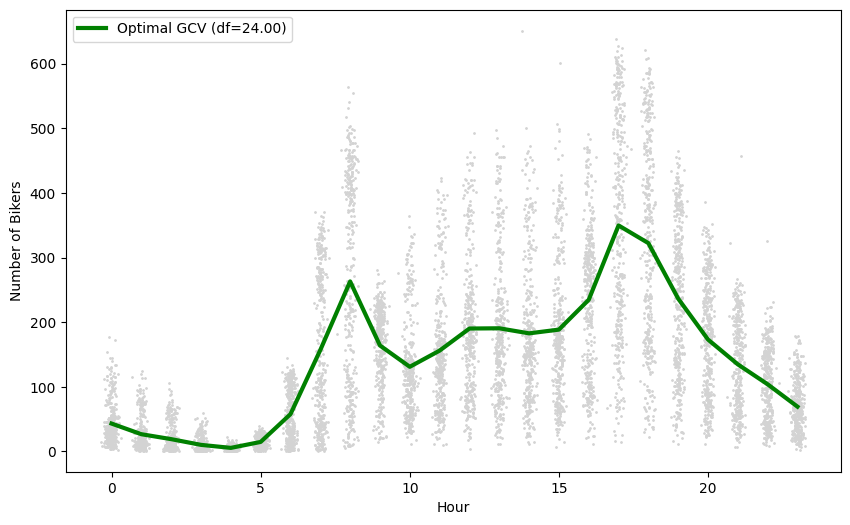
Another Example: Log-Transformation
The relationship between hours and bikers might be better modeled on a log scale, as counts are non-negative and variance often increases with the mean.
# Fit model on log(bikers)
log_bikers = np.log(bikers + 1) # Add 1 to avoid log(0)
spl_log = SplineSmoother(x=hr_numeric, df=df)
spl_log.smooth(log_bikers)

fig, ax = plt.subplots(figsize=(10, 6))
ax.scatter(hr_numeric + np.random.normal(0, 0.1, len(hr_numeric)), log_bikers,
            s=1, c='lightgray')
ax.plot(x_plot, spl_log.predict(x_plot), 'purple', lw=3, label='Log-Smoothing Spline (df={df})')
ax.set_xlabel("Hour")
ax.set_ylabel("Log(Number of Bikers + 1)")
ax.legend()
plt.show()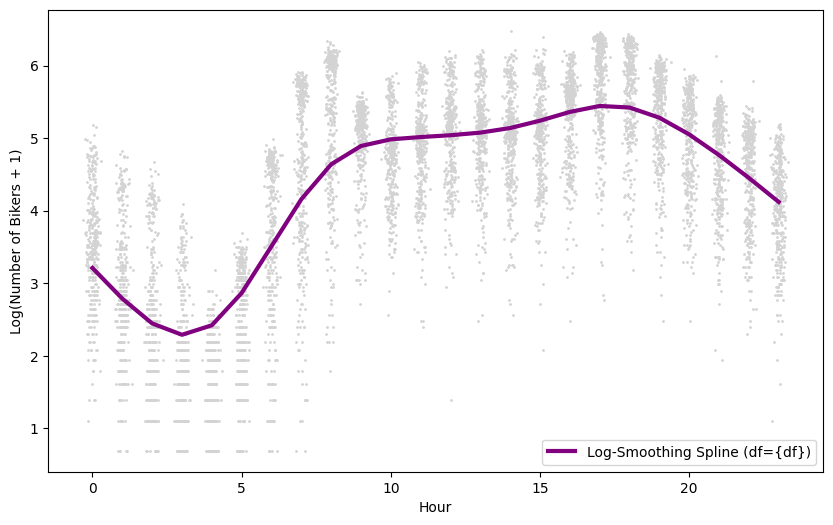
Synthetic Data Comparison (Reinsch Engine / All Knots)
Finally, we compare the speed of both implementations on a synthetic dataset with 500 unique values. Since we use all unique values as knots, scatter_smooth automatically selects the efficient Reinsch engine.
# Synthetic data
n_syn = 500
df = 20
rng = np.random.default_rng(42)
x_syn = np.sort(rng.uniform(0, 10, n_syn))
y_syn = np.sin(np.sqrt(x_syn)*2) + rng.normal(0, 1, n_syn)
x_plot = np.linspace(x_syn.min() - 1, x_syn.max() + 1, 200)

# Python Fitting
spline = SplineSmoother(x=x_syn, df=df)
spline.smooth(y_syn)
y_plot_py = spline.predict(x_plot)

# Python Timing (using all unique x as knots)
print(f"Python Timing (n={n_syn}, all knots):")
%timeit SplineSmoother(x=x_syn, df=df).smooth(y_syn)
Python Timing (n=500, all knots):
949 μs ± 210 μs per loop (mean ± std. dev. of 7 runs, 1,000 loops each)
%%R -i x_syn -i y_syn -i x_plot -o y_plot_R -i df
cat(sprintf("R Timing (n=%d):\n", length(x_syn)))

# Fit once to inspect knots
fit_r_syn <- smooth.spline(x_syn, y_syn, df=df, all.knots=TRUE)
n_knots_r <- fit_r_syn$fit$nk
y_plot_R = predict(fit_r_syn, x_plot)$y
cat(sprintf("Number of knots used by R: %d\n", n_knots_r))

summary(microbenchmark(
  smooth.spline(x_syn, y_syn, df=df, all.knots=TRUE),
  times=100), unit='milliseconds')[,-1]
R Timing (n=500):
Number of knots used by R: 502
min lq mean median uq max neval
1 1.91905 2.245775 3.838386 4.837124 5.260169 7.038565 100
fig, ax = plt.subplots(figsize=(10, 6))
ax.scatter(x_syn, y_syn,
            s=15, c='lightgray', alpha=0.7, label='Data')
ax.plot(x_plot, y_plot_py, 'b-', lw=3, label='Python (scatter_smooth)', alpha=0.8)
ax.plot(x_plot, y_plot_R, 'r--', lw=3, label='R (smooth.spline)', alpha=0.8)
ax.set_xlabel("x")
ax.set_ylabel("y")
ax.set_title(f"Comparison of Smoothing Splines (df={df}) - Reinsch Engine")
ax.legend()
plt.show()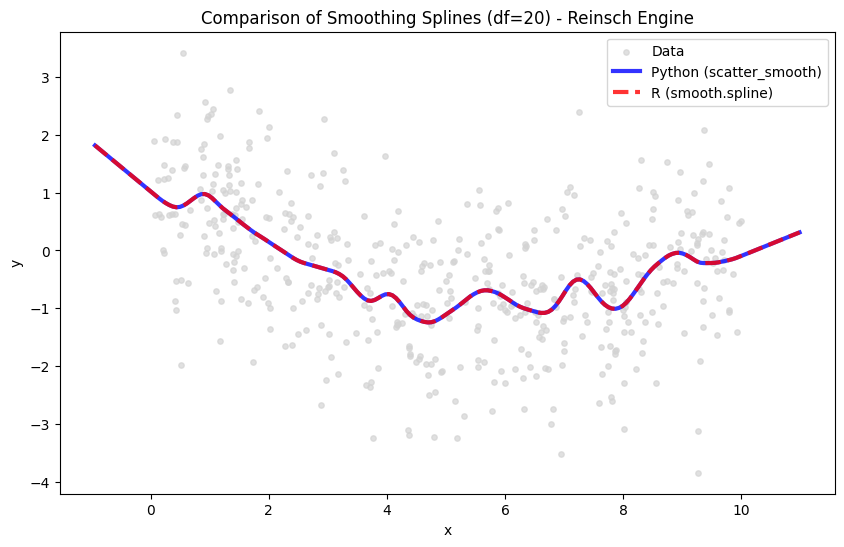
Synthetic Data Comparison (BSpline Engine / Limited Knots)
R’s smooth.spline automatically reduces the number of knots when (typically to around 50-100) to speed up computation. For , R uses about 200 knots (or more depending on settings).
To make a fair speed comparison, we can limit the number of knots in Python as well, which triggers the usage of the bspline engine.
# Python Timing with reduced knots
df = 20
n_syn = 10000
x_syn = np.sort(rng.uniform(0, 10, n_syn))
y_syn = np.sin(np.sqrt(x_syn)*2) + rng.normal(0, 1, n_syn)
n_knots_reduced = 500 # Similar to R's behavior

# Fit for plotting
spline = SplineSmoother(x=x_syn, df=df, n_knots=n_knots_reduced)
spline.smooth(y_syn)
y_plot_py = spline.predict(x_plot)
%%timeit
SplineSmoother(x=x_syn, df=df, n_knots=n_knots_reduced).smooth(y_syn)20.1 ms ± 4.43 ms per loop (mean ± std. dev. of 7 runs, 10 loops each)
%%R -i x_syn -i y_syn -i n_knots_reduced -o y_plot_R -i df
cat(sprintf("R Timing (n=%d):\n", length(x_syn)))

# Fit once to inspect knots
fit_r_syn <- smooth.spline(x_syn, y_syn, df=df, nknots=n_knots_reduced)
y_plot_R = predict(fit_r_syn, x_plot)$y
n_knots_r <- fit_r_syn$fit$nk
cat(sprintf("Number of knots used by R: %d\n", n_knots_r))

summary(microbenchmark(
  smooth.spline(x_syn, y_syn, df=df, nknots=n_knots_reduced),
  times=100), unit='milliseconds')[,-1]
R Timing (n=10000):
Number of knots used by R: 502
min lq mean median uq max neval
1 43.03484 46.52088 62.11212 53.43409 68.65798 146.4491 100
fig, ax = plt.subplots(figsize=(10, 6))
# Subsample data for plotting if N is large
plot_idx = np.random.choice(len(x_syn), size=min(len(x_syn), 1000), replace=False)
ax.scatter(x_syn[plot_idx], y_syn[plot_idx],
            s=5, c='lightgray', alpha=0.5, label='Data (Subsampled)')
ax.plot(x_plot, y_plot_py, 'b-', lw=3, label='Python (scatter_smooth)', alpha=0.8)
ax.plot(x_plot, y_plot_R, 'r--', lw=3, label='R (smooth.spline)', alpha=0.8)
ax.set_xlabel("x")
ax.set_ylabel("y")
ax.set_title(f"Comparison of Smoothing Splines (df={df}) - BSpline Engine")
ax.legend()
plt.show()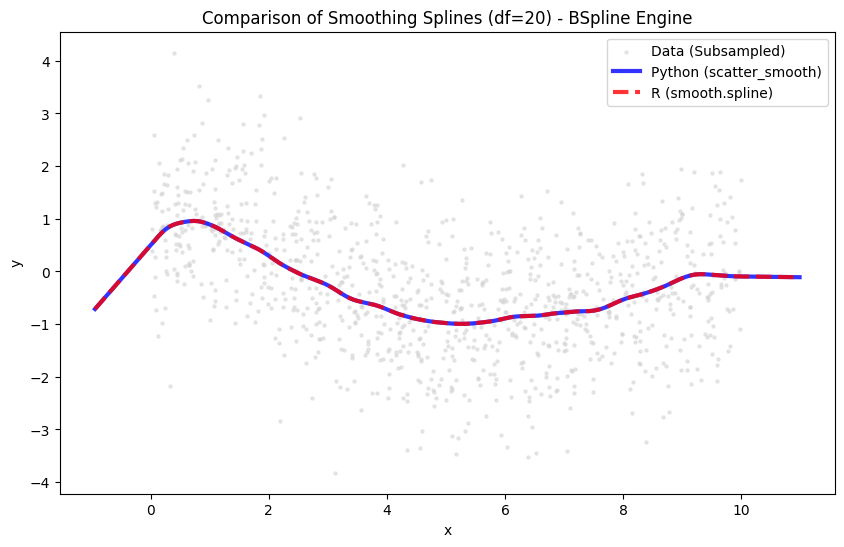
Performance Note
The scatter_smooth package implements efficient trace calculation using Takahashi’s equations for the bspline engine, matching the algorithmic complexity of R’s smooth.spline for degrees of freedom calculation, which is the costliest part as it involves a Cholesky factorization for each candidate lamval.